Posts

How To Free Up Storage Space On Your Android Device
Image
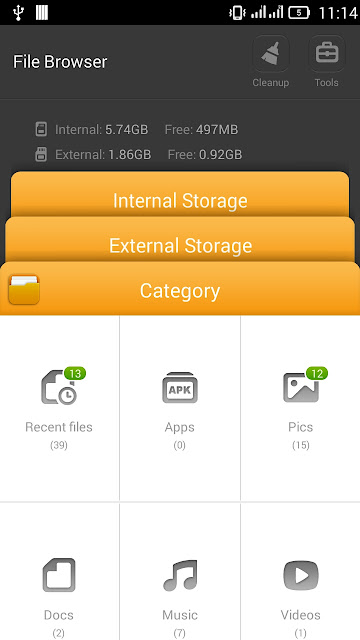
Improve free space on your smartphone to take it run faster. Speed up with this way, your mobile will run faster after Cleanup your Android device . Step 1: Run "File Browser" Step 2: Click to Cleanup. In the Video, you can see that "Last cleanup yyyy-mm-yy Total space saved 1.21 GB " Step 3: Click to "Scan now" and waiting for your device scan App cache , log files , Uninstalled app ... Step 4: Final, click to "Clean all" Note: Never install a Cleanup App from Google Apps, it will make slow down your Smartphone .

[SOLVED] Ping but can not browse google

Image
Your Windows Ping Google OK but can not Browse Google Even PING command there's REPLY but Internet Browser Error "page cannot be displayed" or "Server not found" when connect to Google. The Solution is Your browser use Proxy server with wrong Settings. Fastest way to fix connect to Google Hold Windows button and press R then type this command: inetcpl.cpl , 4 Click to "LAN Settings" , Tick the checkbox " Use a proxy server for your LAN " then Tick the checkbox " Bypass proxy server for local addresses " and Tick the checkbox " Use the same proxy server for all protocols " (After click Advanced TAB) Final, check Google DNS: 8.8.8.8 or 8.8.4.4 P/S: If your Browser don't need Proxy, don't Tick to the checkbox " Use a proxy server for your LAN " Now, don't need to Reboot your Computer, you can connect Google without error !

Download Windows 7,8,10, 11 and Office Direct From Microsoft

Image
Download windows and Office direct from Microsoft : All versions (32bit, 64bit), all languages (EN, US ...) included SHA1 code to check. Without Windows Media Creation Tool ( Create a bootable USB ) , you can use these ways to download Windows, Office ISO file Directly. https://www.microsoft.com/en-us/software-download/windows10iso F12 (Console : Mobile : Refresh) Mirror 1 (Fshare): https://www.fshare.vn/file/3Q9SWUCUXWIJ Download Office 365 Pro Plus ISO Offline Installer :  https://officecdn.microsoft.com/db/492350F6-3A01-4F97-B9C0-C7C6DDF67D60/media/en-US/O365ProPlusRetail.img Mirror 1 (Fshare): https://www.fshare.vn/file/DMSUK2B4BYN3 Method 1: Direct link to download all ISO files from Microsoft There are a lot of direct links, so you can use Ctrl+F to Find your direct link of Office or Windows ISO file. Method 2: Use "user agent switcher for chrome" , select Windows Phone or Android to browse. Default Browse: https://www.microsoft.com/en-us/software-download/windows1...

Enable Telnet on Windows 10

Image
Windows 10 set Telnet disabled as default. So, if you run Telnet will receive this error: Telnet is not recognized as an internal or external command, operable program or batch file . Here's how to turn onTelnet on Windows 10 (Applied to Windows 7, 8, Server) Run CMD (Command Prompt) then paste this command: dism /online /Enable-Feature /FeatureName:TelnetClient Final, Telnet error Fixed !

How to fix chrome font

Image
Chrome Font Before: Chrome Font After" How to fix Chrome font : On the Address bar of Chrome browser, type chrome://flags then click Disable " DirectWrite " windows. Exit your chrome browser then open it again you'll see the new result. You can use this way to fix for Facebook font .

How To Solve The Biggest Problems With Update Driver

Image
Newest drivers make your Windows faster. Control Panel ► Device Manager ( Shortcut: devmgmt.msc ) ► Select the device that you want to Update ► Update driver software Network Drivers Offline install: 3DPNet (3DP Net detects ethernet card automatically)  For Windows 7, 8, 10, server 2008: https://www.3dpchip.com/new/3DP_Net_v2101.exe   For Windows XP, Vista, server 2003-2008: https://www.3dpchip.com/new/3DP_Net_v1703.exe

How to remove unwanted elements in Photoshop

Image
Delete unwanted elements in Photoshop Before After Step 1: Open the picture that you wanna edit Step 2: Select "Lasso Tool" ► Polygonal Lasso Tool ( Shortcut: L ) Step 3: Select the unwanted element that you need Step 4: Edit ► Fill (Shift + F5) Contents: Content-aware Mode: Dissolve Step 5: Press Ctrl + D Step 6: Press Ctrl + Shift +S to "Save as" a new file Full HD Video: https://www.youtube.com/v/EnbBpjLOjBg?autoplay=1&fs=1